Jul 28, 2026 · 12 min read · Security
Local PDF Workflows: What Changes When The File Never Leaves The Building
Ask a legal ops manager why they stopped using a browser PDF converter and you rarely hear "performance." You hear a version of the same sentence: someone uploaded a client agreement to a free website and we could not tell anyone where it went.
That sentence is doing a lot of work. It is not really about PDFs. It is about the fact that "upload a file to process it" quietly moves a document outside the boundary an organisation can account for — and once it has crossed that line, no amount of assurance brings it back.
This is a practical look at what a local-first document workflow actually changes, where it genuinely does not help, and how to tell which of your own tasks belong on which side of the line.
Key takeaways
- The risk is the upload, not the tool. Once a file is transmitted, its handling is governed by someone else's policy.
- "We delete after an hour" is a promise, not a property. A local workflow removes the need to trust it.
- Most everyday PDF work needs no server at all — merging, splitting, compressing, watermarking, filling forms, redaction.
- Some things genuinely do need one: cross-organisation e-signature with an audit trail, and anything requiring a shared source of truth.
- Modern browsers are the runtime, not a limitation. WebAssembly runs the same engines a desktop app would.
- The compliance benefit is that there is nothing to disclose — no processor, no transfer, no retention question.
What a local PDF workflow actually means
The phrase gets used loosely, so it is worth being precise. There are three distinct arrangements, and only one of them keeps the document on your machine:
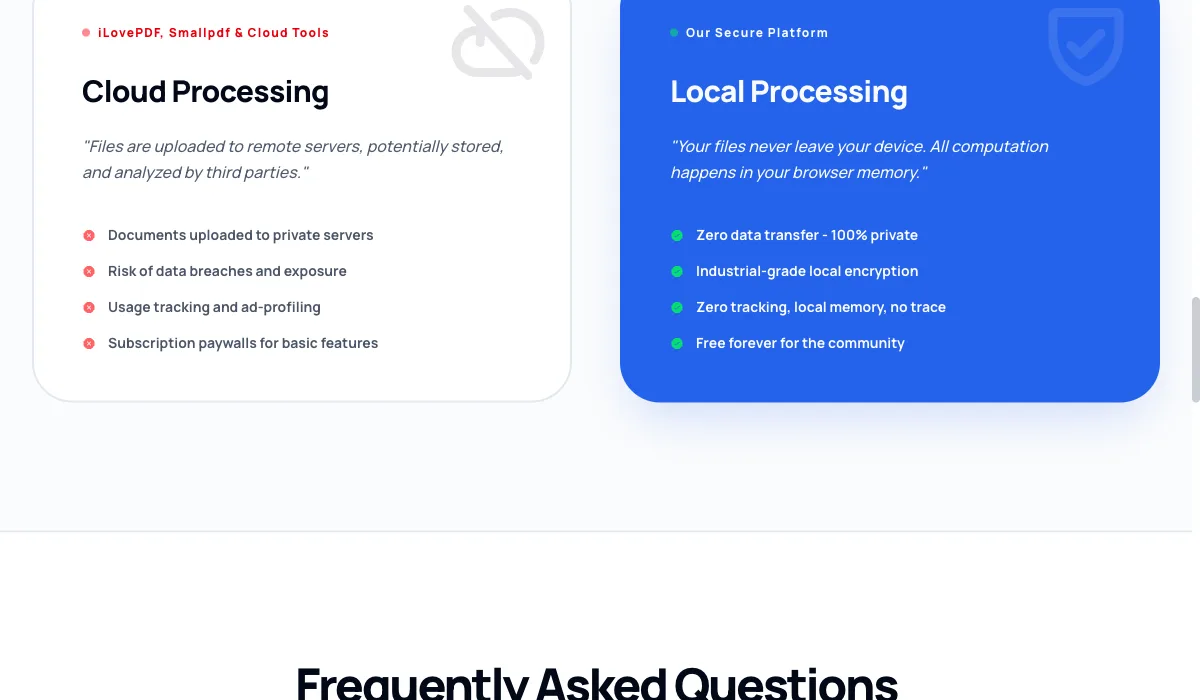
Cloud processing. You select a file, the browser transmits it to a server, the server does the work, and you download the result. The overwhelming majority of free online PDF tools work this way. Your document exists, at least briefly, on infrastructure you do not control.
Desktop software. You install an application. Files are processed on your machine. This is genuinely local, at the cost of an install, an update cycle, per-seat licensing, and IT approval.
In-browser processing. You open a web page, and the processing engine runs inside the browser tab via WebAssembly. The file is read into the tab's memory from your disk and never sent anywhere. There is nothing to install and nothing to transmit.
The third is the one people find hardest to believe, because it looks exactly like the first. Same browser, same drag-and-drop, same download button. The difference is invisible in the interface and total in substance.
How can I tell which one I am using?
You do not have to take anyone's word for it. Open your browser's developer tools, go to the Network tab, and run the tool on a file.
If the document is being uploaded, you will see a request carrying it — a POST with a request body roughly the size of your file. If nothing of that size leaves, nothing of that size left.
It is a thirty-second check and it settles the question permanently for any tool you are evaluating.
Why teams keep landing on local
The retention promise is unverifiable
Reputable cloud processors publish a retention window: files deleted after an hour, after a day, on completion. Those statements are usually true.
But "usually true" is a different category of thing from "structurally impossible." A retention policy is a commitment about behaviour, subject to change, to misconfiguration, to a backup that was not in scope, and to a breach that reaches storage the policy did not describe. You cannot audit it from outside.
A workflow with no upload does not need the promise. There is no copy to retain.
The approval conversation gets shorter
Anyone who has taken a tool through vendor review knows the questionnaire: where is data processed, which sub-processors are involved, what is the retention period, where are the servers, is there a data processing agreement, what happens on termination.
For a tool that processes files in the browser, most of those questions do not have an answer because they do not have a subject. There is no transfer to locate, no processor to name, no retention period to negotiate. That is not a loophole — it is what happens when the data never moves.
Some documents cannot be uploaded at all
Plenty of organisations operate under rules that simply forbid it: client-privileged material, patient records, unreleased financial results, personnel files, anything under an NDA that names permitted systems.
For those documents the choice is not "cloud tool versus local tool." It is "local tool versus doing it by hand," which is why people end up printing, re-scanning and re-assembling documents — a workflow that is worse in every respect, including security.
It works when the network does not
A tab that has finished loading needs no further connectivity. On a plane, in a basement meeting room, on hotel wifi that has decided to captive-portal everything — the tools still run.
This is a genuine convenience, though it is usually the reason people notice local processing rather than the reason they adopt it.
What can you actually do without a server?
More than most people assume. Everything in this list runs entirely in the browser:
- Assembling documents — merge, split, extract pages, delete pages, reorder and rotate
- Reducing size — compress, flatten
- Converting — to Word, to Excel, to images, to Markdown, and the reverse directions
- Editing — add text and shapes, watermark, page numbers, crop
- Forms — fill in or create fillable fields
- Security — password-protect with AES-256, remove a known password, edit metadata
- Redaction — permanently remove text, not cover it
- Review — compare two versions visually
- Recognition — OCR a scan into searchable text
Two of those deserve a note, because they are the ones where a local implementation is better rather than merely equivalent.
Redaction. A great many tools "redact" by drawing a black rectangle over text and saving. The characters remain in the file — selectable, searchable, and recoverable by deleting the shape. This has caused real disclosure incidents in filed court documents. Redaction is only real if the text is removed, which means the affected page has to be rebuilt. Doing that locally means the unredacted version never leaves your machine even momentarily.
Encryption. If a tool encrypts your PDF on a server, then the server saw the document and chose the password handling. Locally, the plaintext and the passphrase both stay put.
Where local genuinely does not work
Being straight about this matters more than the sales pitch, because a workflow built on a false claim fails at the worst moment.
Multi-party e-signature with an audit trail. If you need to send a contract to a counterparty, verify their identity, capture their signature, and produce a tamper-evident log that stands up in a dispute, you need a server. That is not a processing task; it is a coordination-and-evidence task between organisations. A local tool can apply your own signature to a document you already have. It cannot chase somebody else's.
A shared source of truth. Version control, check-in/check-out, "who changed clause 7 and when" — that is a document management system. Local tools operate on the file in front of you.
Very large batches on modest hardware. Local processing uses your CPU and memory. Six hundred scanned pages of OCR on a four-year-old laptop will take a long time, and a server farm will beat it. The trade is speed against disclosure; for six hundred pages of public documents, take the speed.
True PDF/A archival conformance. Producing a file that genuinely validates as PDF/A requires embedded colour profiles, XMP metadata and complete font embedding. Any tool claiming a one-click local PDF/A conversion is overstating what it produces — a distinction that matters if a regulator is going to validate the output.
How the two fit together
The useful framing is not local versus cloud. It is: which documents can cross the boundary, and which cannot?
A workflow that works in practice tends to look like this:
- Sensitive, routine, single-document work → local. This is the bulk of it, and it is the part that carries the risk.
- Cross-organisation signature and coordination → a dedicated platform, chosen deliberately, with a real agreement in place.
- Bulk processing of non-sensitive material → whatever is fastest.
The mistake is not using cloud tools. It is using them by default — reaching for the first search result at the moment you happen to have a contract open, and making a disclosure decision without noticing you made one.
A note on what "free" is paying for
It is worth asking how a free cloud converter covers its compute bill. Usually the honest answer is advertising, which is fine and legible.
But a document is a uniquely rich thing to have possession of, and "we do not look at your files" is — again — a promise rather than a property. You are not obliged to assume bad faith. You are entitled to prefer an arrangement where the question is moot.
In summary
The case for local document processing is not that cloud tools are careless. It is that the upload step introduces a question — where is this document now, and who is accountable for it? — that has no good answer and does not need to be asked at all.
For the large majority of everyday PDF work, the server was never doing anything your own browser cannot. Removing it removes the question.
Related reading
- OCR PDF — recognition that runs on your device
- Redact PDF — remove text properly, rather than covering it
- Protect PDF — AES-256 encryption applied locally
- Compare PDF — spot changes between two versions
- All tools — the complete local-first toolkit